The instrument behind Emm Te
Aural Forge
Aural Forge is my own synth: the instrument I program, experiment with, and use in the music I release as Emm Te.
I’m building it around the way I like to explore sound. Familiar synthesis ideas can be pulled apart, recombined, given voice-level binaural depth, modulated at audio rate, sequenced, layered, and routed without turning the instrument into a collection of disconnected plug-ins. The point is to keep the weird, useful sound-design decisions close enough to the track that I can keep following them instead of stopping to manage the tool.
Right now it is a four-layer modular software synthesizer with binaural voice rendering, profile-driven oscillator structures, six-operator FM, wavetable and sample playback cores, dual filters, generative note tools, deep modulation, and a multi-bus effects rack.
4
performance layers
256
voice pool per layer
16×
maximum unison per note
L ↔ R
binaural voice pairs
Unison draws from each layer’s 256-voice pool. A 16-way unison note uses 16 of those available voices; it does not multiply the layer into 256 separate voices with 16-way unison on top.
Designed in stereo
Binaural at the voice level.
Binaural mode is part of the synth’s voice architecture, not a widening effect added at the end. Aural Forge can render paired left and right lanes inside each unison voice, then control how those lanes occupy width and phase.
Because the whole voice path can be stereo, width is not limited to a final pan knob. Individual oscillators can be placed deliberately inside the patch, and in the OP6 FM engine even carriers and modulators can occupy different parts of the stereo field.
The motivation came from seeing UDO-style stereo voice architecture and thinking that linked left/right voice pairs were a strong foundation: parameters can stay meaningfully in sync, but selected parts of the voice can diverge in controlled ways through offset, detune, phase, or analog-style variation. That gives me a way to build very wide stereo basses and leads without inviting random phase problems unless I explicitly ask for that behavior.
01 · Voice placement
Paired lanes
Each unison voice can carry a related left/right pair. Binaural width controls the separation while keeping the stereo image attached to the note and voice that created it.
02 · Phase contract
Locked or offset
Oscillator phase can stay locked between binaural lanes or use a deliberate offset. The useful part is having the choice: stable stereo when the low end needs discipline, or intentional drift when the patch wants movement.
03 · Stereo modulation
Per-lane motion
Random and modulation sources can vary at binaural-lane scope. Movement can therefore emerge inside the voice instead of relying only on pan automation, chorus, delay, or reverb after the fact.
04 · Quality budget
Two real mono paths
The cost is performance: binaural mode means running two full mono voice paths instead of faking width at the output. That tradeoff fits the synth’s bias toward quality and control over raw efficiency.
Binaural mode, unison count, detune distribution, oscillator phase, and supersaw stereo behavior remain separate controls. The useful part is not simply “more stereo”; it is choosing where stereo divergence enters the synthesis path. If the patch should go fully wide and unstable, a binaural free-running supersaw can do that too: each voice can become a stereo field of saws running at different phases instead of a single centered oscillator made wide later.
01
Development build
Hero editor overview
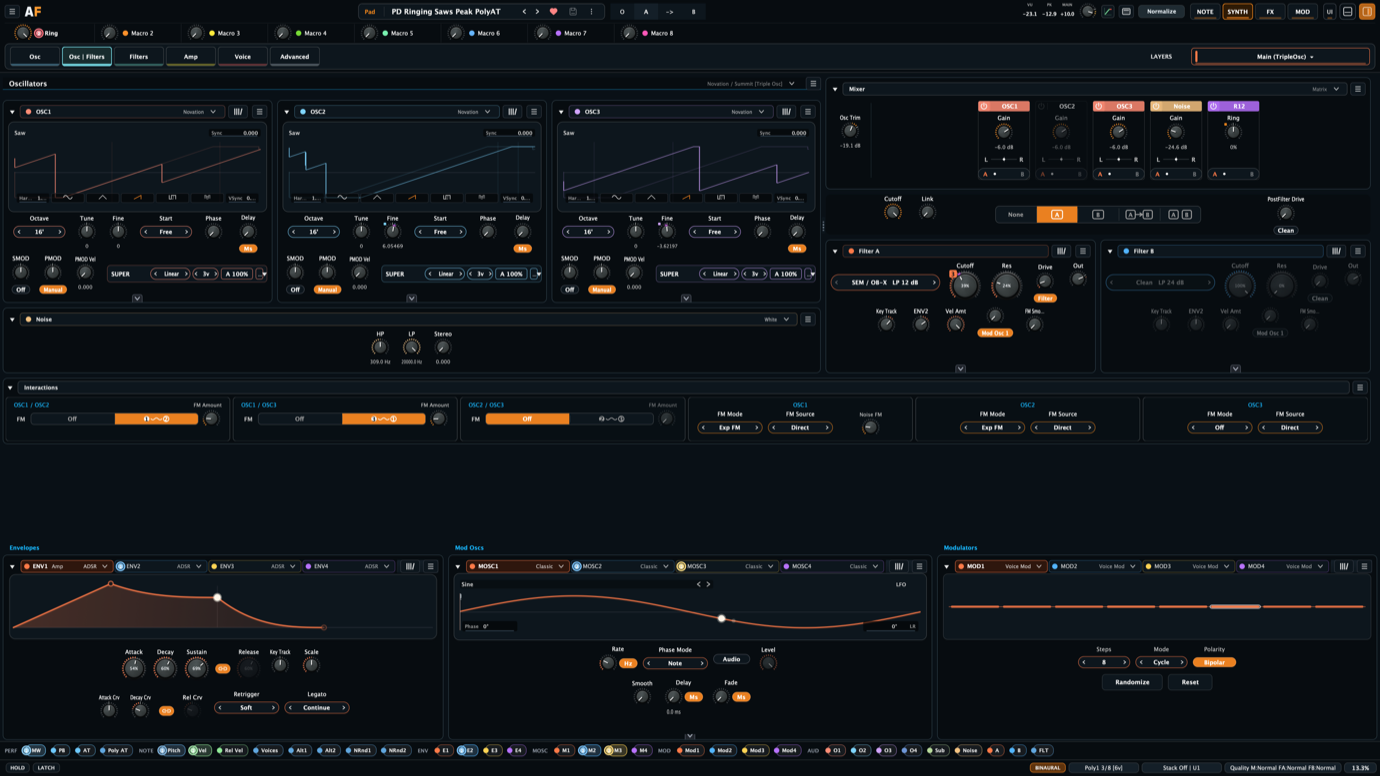
Architecture, not a pile of modes
The useful separation: core, block, profile, Super Voice.
Aural Forge separates the sound engine inside an oscillator slot from the topology that connects oscillators, then lets a profile reshape those relationships without inventing another synthesis engine. Super Voice is another layer in that same system: it treats the stacked-detuned voice as an oscillator construction method, not just a named saw waveform.
01 · Oscillator core
The sound engine
Thirteen implemented cores cover modern analog and digital synthesis, model-oriented VCO and DCO behavior, supersaw, wavetable scanning, and simple sample playback.
02 · Oscillator block
The topology
Eleven block surfaces determine how oscillators coexist: lean Single Osc profiles, a four-slot Modern block, reusable Dual and Triple structures, six-operator FM, and model-oriented layouts with dedicated interaction systems.
03 · Oscillator profile
The relationship policy
A profile changes which sync, FM, ring, sub, and noise relationships are available and how they are presented. Hidden relationships become inert without destroying their authored values.
04 · Super Voice
The generalized stack
A classic supersaw starts from a very specific trick: multiple detuned saws inside one oscillator. Super Voice keeps the useful part of that idea but moves it below the waveform choice. The stack inherits whatever the slot is doing, so width and density can belong to a triangle, sine, pulse-width patch, wavetable, or model-oriented VCO instead of forcing every big sound through a saw core.
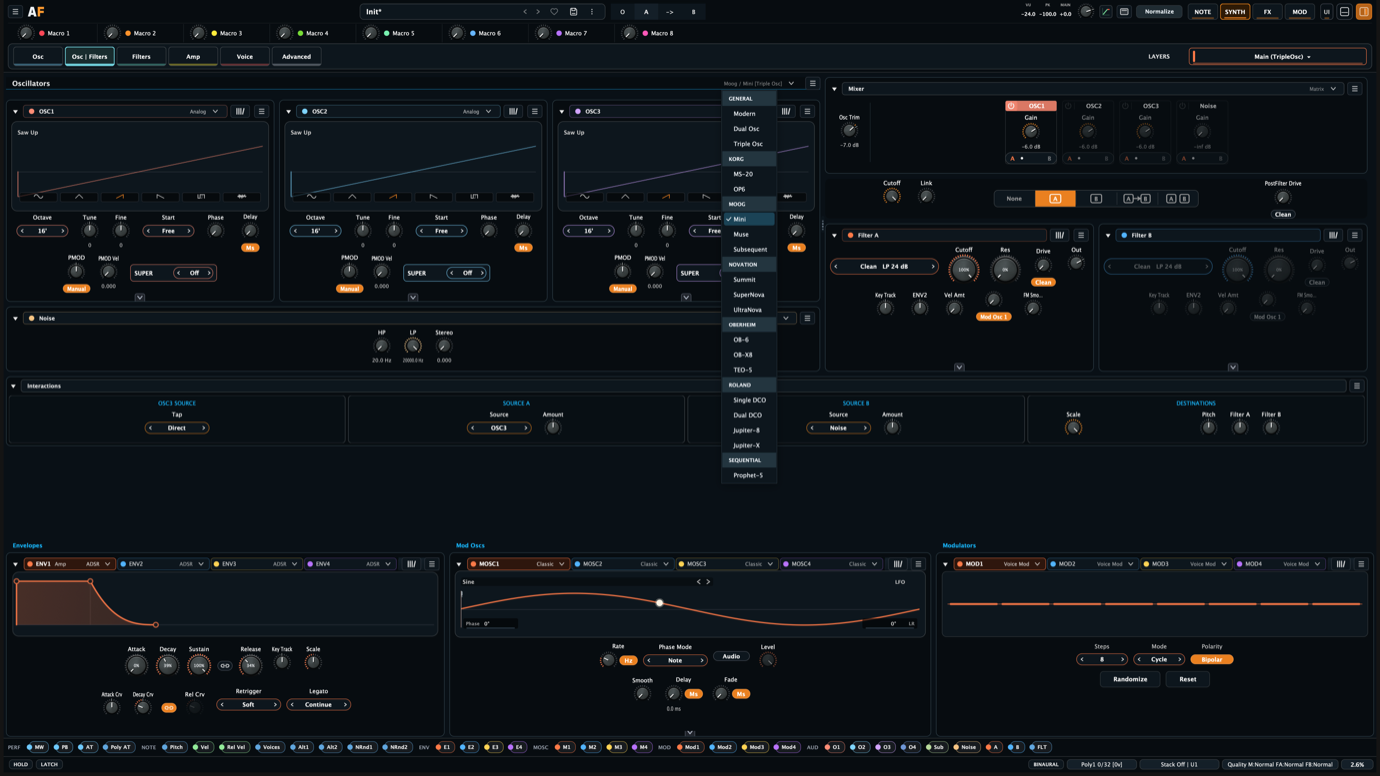
The grouped picker currently exposes twenty-two choices across General, Korg, Moog, Novation, Oberheim, Roland, and Sequential families. Each named profile aims to provide the workflow and characteristic oscillator relationships of the hardware that inspired it.
The current instrument templates carry that idea into performance behavior too. They can recall a hardware-oriented voice count and Play profile alongside the oscillator structure: five voices with retriggering for the Prophet-5 template, six-voice starting points for Juno and OB-6, or monophonic priority behavior for Mini and MS-20 templates.
The sound engines inside the slots
Thirteen oscillator cores before the block even matters.
The oscillator block decides the topology. The core is the thing actually making sound inside a slot. That distinction matters because one layer can move between clean digital behavior, model-oriented analog behavior, supersaw, wavetable scanning, and sample playback without pretending those are all the same oscillator with different labels.
General-purpose cores
Modern Analog / Modern Digital
These are the flexible starting points: hard sync, linear FM, exponential FM, through-zero FM, pulse width, and the usual pitch and phase controls. Use them when the patch needs to be direct and programmable rather than tied to a named instrument workflow.
Model-oriented VCO / DCO cores
Roland, Moog, Korg, OB, Sequential, UDO
These cores aim to provide the workflow of familiar hardware families: DCO and VCO behavior, waveform morphing, exact component taps, phase-only advance, pulse width, and model-specific modulation points. The goal is not a generic “analog” switch; it is a set of useful relationships for writing patches.
Stacked oscillator behavior
Super Voice / Supersaw
The dedicated Supersaw core is the obvious JP-8000-style case: seven saw voices and the familiar wide lead and pad vocabulary. Super Voice is broader. It multiplies the selected oscillator core and keeps that core’s shape, modulation behavior, model profile, and stereo-phase law attached to the stack. That makes it less like adding a widener and more like turning one oscillator idea into a small controlled ensemble.
Table and asset cores
Wavetable / Sample
Wavetable scanning and sample playback both sit inside the same larger patch system as the analog-style cores. Wavetables are for animated oscillator motion; samples are currently direct playback sources that can still be shaped by modulation, filters, layers, and effects.
The current core list is: Modern Analog, Modern Digital, Roland DCO, Roland VCO, UDO Morph, Moog VCO, Korg Analog, Supersaw, Wavetable, Novation, Sample, OB VCO, and Sequential VCO.
The oscillator department
Eleven blocks, twenty-two ways in.
Some oscillator blocks are open laboratories. Some reuse one topology while changing the relationship policy to follow a particular instrument. Others need dedicated controls because the reference synth does something structurally different.
How profiles work: each one aims to bring the reference hardware’s workflow into Aural Forge—its oscillator count, modulation paths, sync direction, ring routing, sub behavior, and the controls that make that instrument feel distinctive.
General · four slots
Modern
The deliberately non-emulative block: four compatible oscillator cores can coexist in one layer. Analog, digital, supersaw, wavetable, and sample playback sources can be mixed without forcing them into a vintage panel.
The flexible laboratory · four independent primaries · mixed synthesis methods
General · one oscillator
Single Osc
The deliberately lean block. Osc, Osc + Sub, and Osc + Sub + Noise profiles keep one primary oscillator and reveal only the supporting sources the patch needs. It is useful when the character comes from the signal path after the oscillator rather than from a larger interaction matrix.
Osc · Osc + Sub · Osc + Sub + Noise
Reusable · two oscillators
Dual Osc
One two-primary engine, four relationship policies. Main exposes the full Aural Forge set; Korg MS-20 narrows the pair to ring modulation; Moog Muse keeps bidirectional FM, one-way sync, and ring; Moog Subsequent centers the sub oscillator and Osc 1 → Osc 2 sync.
Main · Korg MS-20 · Moog Muse · Moog Subsequent
Reusable · three oscillators
Triple Osc
Main opens broad pairwise FM, sync, ring, and noise FM. The Moog Mini profile replaces that generic matrix with a Minimoog-inspired two-source modulation bus. Novation Summit, SuperNova, and UltraNova each expose their own directional FM, sync, ring, and noise relationships.
Main · Moog Mini · Novation Summit · SuperNova · UltraNova
Korg lineage · six operators
OP6
A dedicated six-operator FM environment inspired by the Korg opsix. Algorithms are only the starting point: operators can use varied waveforms, envelopes, filters, self or stack feedback, ring modulation, and Filter FM.
One block among eleven · 40 algorithms · deep operator editing
Oberheim lineage · dedicated
OB-6
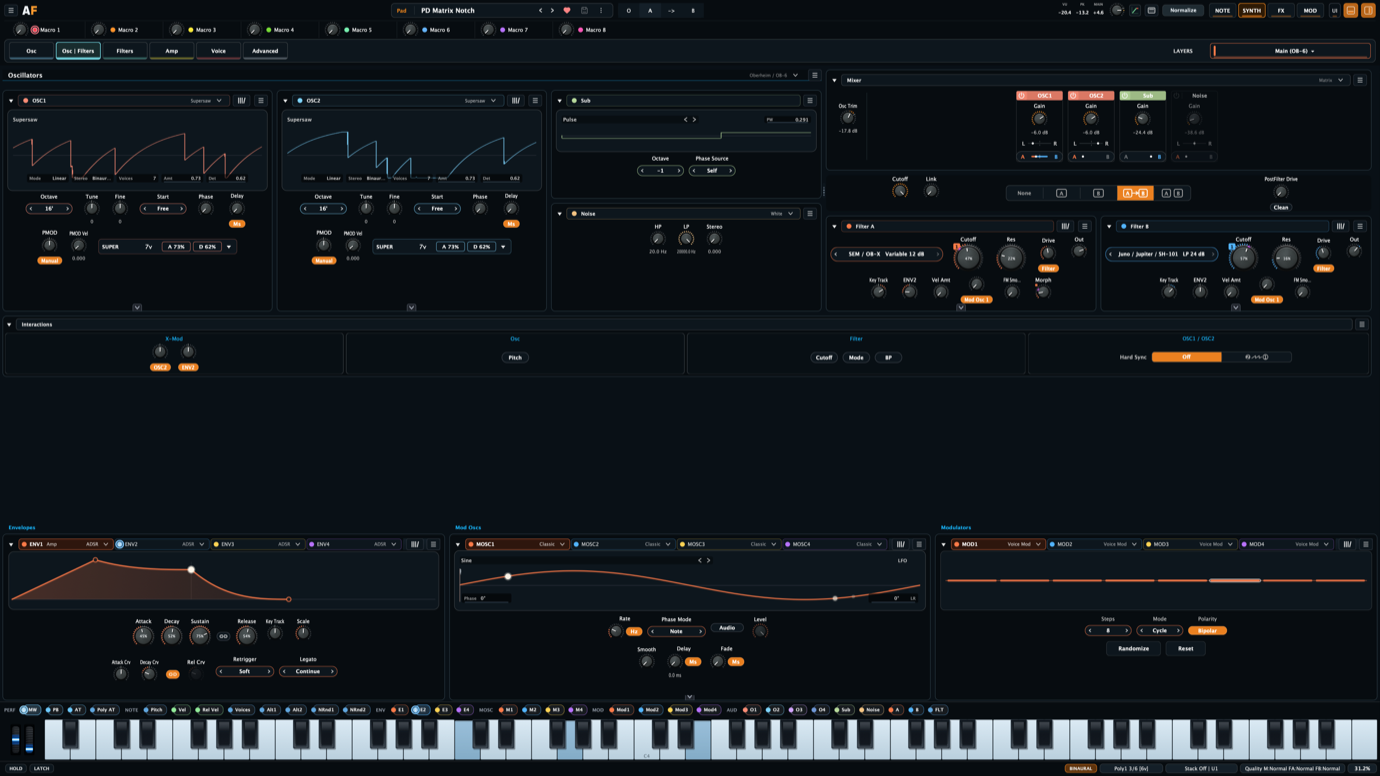
A two-oscillator Oberheim/Sequential-style surface with linked sub presentation and an X-Mod matrix. Oscillator or envelope sources can be routed into VCO pitch, waveform shape, pulse width, filter cutoff, filter mode, and band-pass behavior.
Hard sync · linked sub · multi-destination X-Mod
Oberheim lineage · dedicated
OB-X8
An OB-X8-inspired relationship surface with hard sync, selectable envelope cross-modulation, triangle cross-modulation, and dedicated LFO routing into both oscillator pitches, both pulse widths, both filters, and voice level.
Dedicated LFO bus · triangle X-Mod · OB-family interaction model
Oberheim lineage · dedicated
TEO-5
A TEO-5-inspired pair structure built around its own cross-FM and sync behavior rather than borrowing the generic Dual Osc panel. FM law, source, amount, and AC-coupling controls stay together as one focused interaction surface.
Two primaries · selectable cross-FM · dedicated sync direction
Roland lineage · DCO
Roland DCO
A Roland DCO-family workflow rather than one named instrument clone. The goal is to cover the useful territory from single-DCO Juno voices through Alpha Juno wave programs and into the dual-DCO JX style.
For Juno-60/106-style patches, that means the familiar stable DCO foundation: saw, pulse/PWM, sub oscillator, noise, range, pitch modulation, and the kind of direct oscillator mixer that makes those synths feel fast. For Alpha Juno territory, the important part is the expanded wave palette: special saw, pulse, and sub shapes that go beyond a plain saw/square switch and are a big part of that sharper, animated Roland character.
For JX-style patches, the same core can be used inside dual-DCO profiles where the relationship between the oscillators matters: detune, range, fine tune, sync, cross-mod-style interaction, and filter-ready source balance. That keeps Juno simplicity and JX complexity in the same family without flattening both into a generic “analog oscillator.”
Juno-60 / Juno-106 · Alpha Juno wave shapes · JX-3P / JX-8P / JX-10-style dual-DCO workflows
Roland lineage · VCO profiles
Roland VCO
The Jupiter-8 profile presents two primary VCOs and one interaction pair. Jupiter-X expands the same architecture to four primaries in two pairs. Shared pitch/PWM modulation, bidirectional sync selection, ring, and cross-modulation follow the active topology.
Roland Jupiter-8 · Roland Jupiter-X
Sequential lineage · dedicated profile
Sequential
The Prophet-5 profile gives the pair its characteristic hard-sync and Poly Mod structure. Oscillator 2 can drive Oscillator 1 pitch or pulse width and either filter cutoff through a model-oriented source/destination surface.
Sequential Prophet-5 · hard sync · oscillator-and-filter Poly Mod
The practical result is that changing from MS-20 to Muse is not merely choosing a skin. It changes which oscillator relationships exist in the active topology. Unsupported relationships become inert, while their stored values remain available if the profile is revisited.
02
Development build
Oscillator profile picker
Multiple routes into a sound
Analog structure, digital depth, and then the FM rabbit hole.
Once the cores are in place, the useful question becomes what each one lets me do in a track. Sometimes that is a tight analog-style oscillator pair. Sometimes it is a moving wavetable. Sometimes it is a supersaw that stays wide, controlled, and phase-aware instead of becoming a stereo mess.
Analog and model-oriented cores

These cores make hardware-inspired patches straightforward by putting the important oscillator relationships behind direct controls.
Roland DCO: Juno-style configurations keep the waveform choices switchable while giving saw and pulse independent level control.
Moog VCO: choose fixed waveforms for a Mini-style workflow or morph between shapes for the blended territory of the Subsequent and Muse.
Oberheim VCO: switch, blend, or morph classic configurations. The inverted saw/pulse relationship creates distinctive multi-edge shapes, while PWM moves the cancellation points through the waveform.
The original hardware is a useful starting point, not a limit.
Novation-style digital oscillator

The Novation core deserves its own lane because it is not just another saw/pulse oscillator. It is inspired by the Peak/Summit FPGA oscillator mindset: digital control, but with enough shape and sync behavior to feel like a sound-design instrument instead of a static wavetable player.
VSync, hardness, sync skew, formant width, sync key follow, pulse width, FM, through-zero FM, hard sync, and profile-specific ring/noise relationships make it useful for glassy sync tones, sharp plucks, formant-edged leads, and pads that need more contour than a normal detuned stack.
Summit / Peak direction · VSync · hardness · shape modifiers · FM and sync relationships
Super Voice and Supersaw

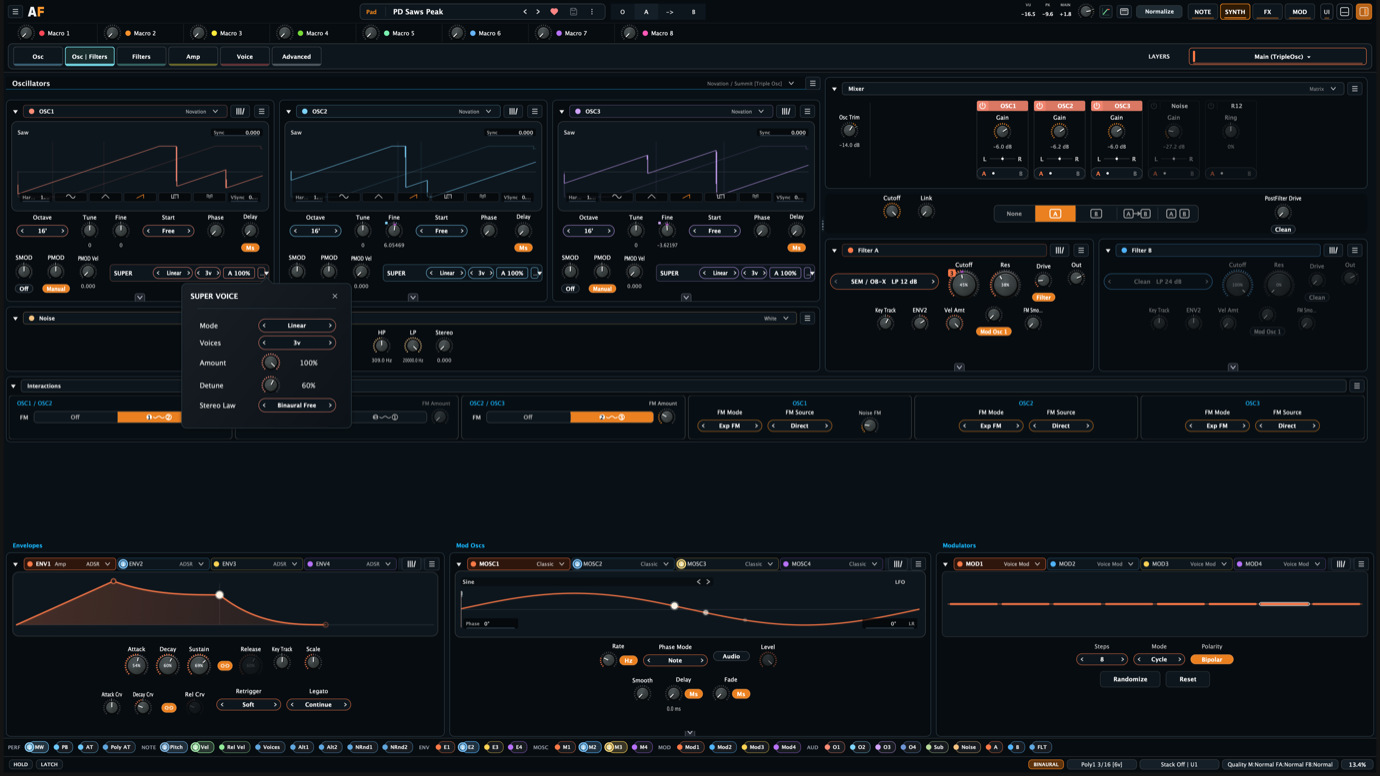
Supersaw is the dedicated stacked-saw core. Super Voice is the more unusual part because it sits at oscillator level, before the rest of the voice path. Off, Linear, or Gaussian distribution, one to seven internal voices, amount, detune, and stereo law decide how the oscillator is multiplied before it hits the mixer, filters, drive stages, modulation matrix, and effects.
Use it when the patch needs density, motion, or stereo size but still needs to sound like the oscillator it started from: a wider PWM bass, a multiplied wavetable motion, a thick model-oriented VCO, or the full stacked-saw trance thing when that is actually the right move.
Wavetable

Wavetable cores combine content browsing, position scanning, interpolation, live waveform previews, hard sync, and through-zero FM. The same wavetable idea also appears inside modulation oscillators.
Asset browsing · live/static preview · previous/next navigation · audio output from modulation oscillators
Sample playback

The sample core is intentionally simple at this stage: load an asset, play it back, keep the waveform context visible, and let the rest of Aural Forge handle modulation, filtering, layering, and effects.
WAV, FLAC, AIF, AIFF · drag and drop · gain normalization · waveform and loop context
Controlled imperfection

Independent oscillator, filter, envelope, and voice behavior can stay digitally stable or introduce authored component and voice variation. Analog variance and digital drift remain separate systems. The complete combination can be saved and recalled as a Trimmers group preset; the current Warm Analog preset collects pitch, shape, cutoff, envelope-time, and glide variation into one starting point.
Cutoff, envelope-time, shape, glide, pitch, oscillator drift, and filter drift models
Korg opsix-inspired OP6
OP6 is one oscillator block among eleven, but it earns a close look after the core story is clear. Six operators run through forty algorithms with global, self, and stack feedback. Each operator has its own envelope and can act as FM, ring modulation, a filter, or Filter FM, not merely as a sine-wave carrier.
Since OP6 sits inside the same stereo voice path, operator placement can become part of the sound design too: a carrier can stay centered while the modulator feeding it is offset, or a more aggressive patch can spread both sides of the FM relationship.
Ratio or fixed frequency · nineteen waveforms · per-operator filtering · 1× to 8× quality modes
03
Development build
OP6 operator view

04
Development build
Super Voice as an oscillator-level stack
Filtering and signal flow
Two filters, but not just in series.
The Matrix mixer gives each source its own filtered/direct destination and Filter A/B balance before the two filters run in parallel or series. Classic and CP3 are different choices: they combine sources into a shared mixer path, then use a global A/B balance.
Reference-led, not just reference-named: the filter set has been worked through topology by topology against circuit documentation, established virtual-analog design methods, trusted implementations, analyzer comparisons, and listening. Drive, resonance, compensation, response selection, and output level belong to the chosen signal path rather than being one generic character layer behind different names.
Eight filter families
Clean/digital, ladder, diode ladder, analog cascade, Juno-106 HPF, state-variable, Sallen-Key, and dirty families cover low-pass, high-pass, band-pass, notch, and morph responses where the topology permits.
Twenty profiles
Clean, Dirty, Moog Ladder, Diode, SSI2144 Ladder, TB-303, Roland IR3109, Jupiter-8, Juno-6/60, Juno-106, SH-101, Juno-106 HPF, SSI 2140, Prophet-5 Rev1/2, CEM3320, CEM3320 Variable, Prophet-5 Rev3, SEM/OB-X, Sallen Key, and MiniBrute. Each profile selects its supported responses and poles together with its own drive, resonance, compensation, and quality behavior.
Mixer as tone choice
Matrix is the separated routing view: individual sources can go direct or filtered and choose their own A/B balance. Classic and CP3 are shared-character mixers, useful when the point is how oscillators overdrive together before they hit the filters.
Drive before, between, and after
Matrix exposes per-source routing. Classic adds shared summed-mixer behavior and feedback. CP3 adds overload amount and overload mode. All of that sits beside global A/B balance, switchable pre-filter drive, post-filter coloration before the VCA, post-VCA overdrive in the Amp stage, and direct-versus-filtered choices where the selected recipe supports them.
The pre-filter stage can stay clean, use the filter model’s own drive, or use analog-style saturation before cutoff. Post-filter color can be Clean, Analog, or Soft Clip before the VCA. VCA Overdrive can remain Clean or use Muffler after the envelope and VCA gain, placing its distortion at a genuinely different point in the voice.
Audio-rate FM
Both filter slots accept FM from oscillators, modulation oscillators, sub, noise, either filter, or the combined filter output, with amount and smoothing controls.
Roland as a signal path
Roland IR3109, Jupiter-8, Juno-6/60, Juno-106, and SH-101 profiles share a family but not one generic response. Profile-owned feedback, resonance, saturation, and level behavior sit beside a dedicated Juno-106 high-pass and bass circuit. Juno noise and chorus extend the same idea beyond the filter, with tone-shaped stereo noise, reference-aligned chorus motion, and selectable Smooth or Clocked BBD engines.
CEM3320 beyond LP24
The four-cell CEM3320 path provides 24 dB low-pass, high-pass, and band-pass routings. CEM3320 Variable adds 12 dB low-pass, high-pass, band-pass, and notch behavior from the chip’s state-variable application. Both keep their own cell headroom, asymmetry, resonance limiting, output-VCA behavior, drive, and quality policy.
A 303 path with an evil side
Single Osc, the Accent modulation source, the TB-303 ladder, and post-VCA Muffler overdrive can form a complete acid-oriented signal path without locking Aural Forge into a fixed emulation. It can stay tight and controlled—or, if you’re finding yourself in an evil mood, the Drive range goes massively high for some very nice distortion.
That makes the filter section flexible enough to stay fully digital and precise, or to behave more like an analog signal path where the sound is pushed at the right points. Depending on the patch, that can mean clean control, Moog-style overdrive, or Novation Peak/Summit-style warmth and dirt before the sound ever reaches the effects rack. This is also why the gain-staging graph matters: mixer level, pre-filter drive, filter output, post-filter distortion, VCA level, and post-VCA overdrive each hit the signal at a different point.
05
Development build
Dual filters and source routing
Motion and expression
Modulation can listen to the synth.
Oscillators, sub, noise, filters, and filter output can feed the modulation system alongside performance, envelopes, macros, curves, random systems, and modulation oscillators.
32 compound routes
Every route carries a primary source, curve shaping, scope, depth, and two invertible, scalable auxiliary terms that can condition or multiply the main signal.
Twelve motion engines
Four envelopes, four modulation oscillators, and four multi-engine modulators cover classic LFOs, wavetable motion, step systems, random behavior, and editable 2–32 point curves.
Performance as structure
Eight macros, velocity, pitch bend, pressure, note signals, voice state, stereo side, and route-specific random sources connect performance to the same matrix.
Four slots. Three engines each.
The four multi-engine modulators are not four more fixed LFOs. Each slot can become Voice Mod, Random, or Curve, so that part of the modulation rack can handle voice-to-voice variation, controlled drift, or a deliberately drawn movement without dedicating a separate panel to every job.

Voice Mod
Voice Mod is not a conventional step sequencer running through time. It holds 1–16 values and assigns them across note groups. Cycle advances once for each new group, Stable keeps held groups on distinct slots and reuses a slot when its note is released, and Random makes the assignment unpredictable.
With bipolar or unipolar output, those values can become subtle voice variation or an intentional pattern across pitch, pan, filter character, wavetable position, or another destination.
Random
Random generates stepped movement at a free or host-synced rate, then separates how far the next value may travel from how smoothly it gets there. It can be scoped per note, per unison voice, or per left/right unison voice.
That makes the difference between a whole note drifting together, each stacked voice wandering independently, or the two halves of a binaural voice diverging in a controlled way.
Curve
Curve is the authored motion engine: 2–32 editable points running as a loop, one shot, or envelope at a free or host-synced rate. Global, Note, First Note, and Host Sync phase modes decide when that shape begins, while legato behavior, phase, and polarity control how it responds in a patch.
I use it when the movement should have a deliberate shape rather than feel like a stock LFO: a rhythmic contour, a long transition, a one-shot timbral gesture, or a custom envelope.
Audio taps can run as audio-rate sources, depending on the route and quality context. That distinction matters because “audio-rate modulation” should mean something specific, not just sound like a better bullet point.
06
Development build
Full modulation matrix

Notes as material
Matrix first. Tracker when the pattern needs to go deeper.
Matrix is now the primary note-generation workflow. Instead of treating every step as a fixed MIDI note, it can describe a playable relationship: use the root, use a fixed note, or use K1–K5 from the notes currently being held. Input order decides which held note becomes each K role, so the same pattern can follow a different chord or voicing without having to be rewritten.
Input to output
The pattern starts before step one.
The visible lanes are the middle of a three-stage note pipeline. The controls around them decide what Matrix receives, how the arp interprets it, and what the finished phrase is allowed to send.
- Input FilterSets the pitch range, ordering of held notes, missing-key behavior, quantization, and whether notes wrap back into range.
- Arp EngineOwns length, rate, gate, swing, restart, fixed-note behavior, velocity source, and scale detection or selection.
- Output FilterApplies final octave or semitone transposition, output wrapping, and controlled random variation in gate, velocity, or start position.
This makes the same pattern useful as a tightly bounded chord follower, a scale-aware arp, a transposed variation, or a looser generative phrase while its step data remains intact.


64
Matrix steps across four pages
K1–K5
playable held-note roles
7
aligned pattern lanes
1–8
tracks in advanced Tracker mode
Harmony in motion
See what the pattern is doing.
The live strip follows held input through its assigned K roles, detected harmony, output note, and current playback state. Chord modes can normalize a shape, preserve its played voicing, or keep a low root; generated notes also retain their physical key and channel so polyphonic aftertouch stays attached through retriggers and release.

Four pages, one idea
Build variations while it plays.
Each pattern spans four sixteen-step pages. Follow and Lock control how the editor moves with playback; rotation, copy, paste, and page initialization make variations quick to audition. Finished patterns can be browsed, favorited, saved, and reused like sounds or effects chains.

Advanced mode
Tracker is still there when the pattern needs more structure.
The old-school multitrack view provides one to eight tracks, up to sixty-four rows, explicit note and rest behavior, independent gate and note probability, and two modulation values per row. Those lanes can sequence filter movement, FM amount, wavetable position, effect depth, or another modulation destination alongside the notes.


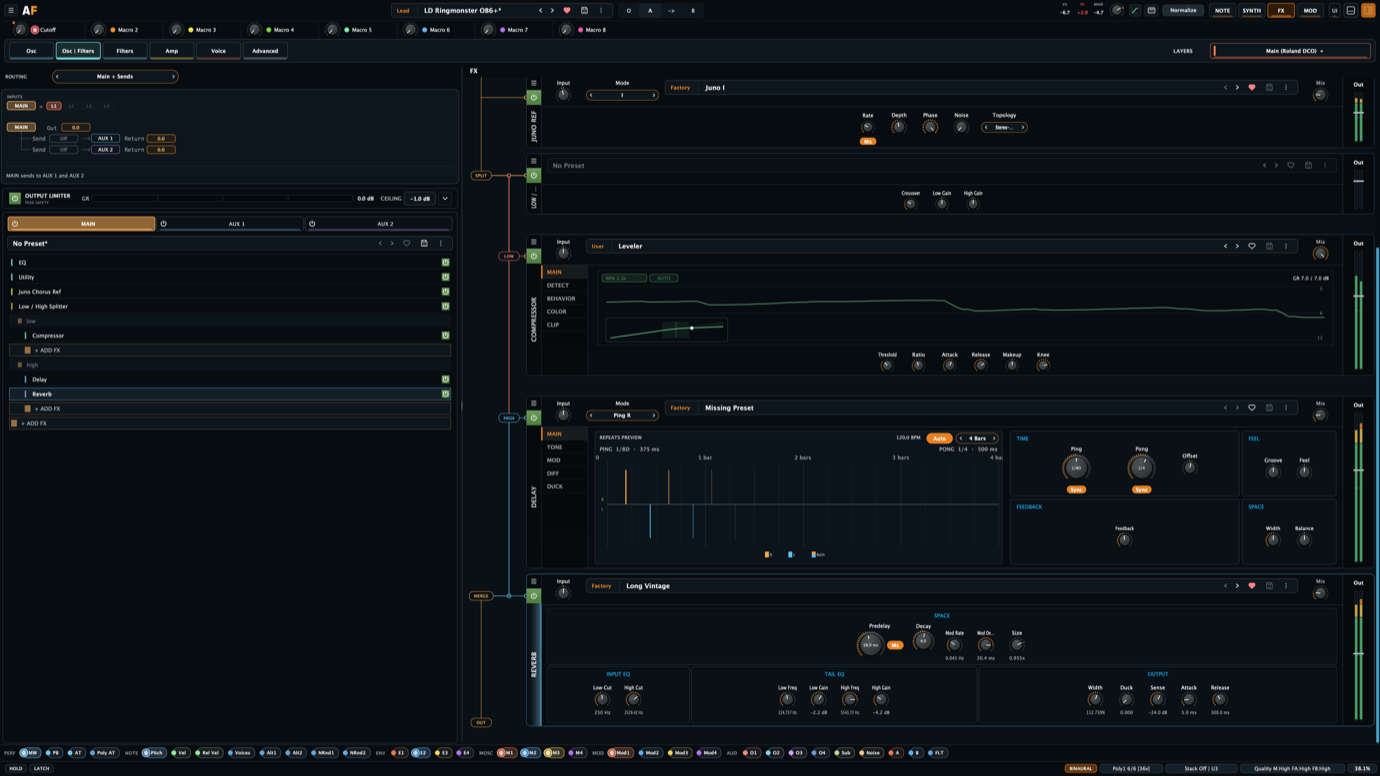
Effects as architecture
Split the signal, not the workflow.
The effects rack has a main chain, two buses, cross-bus sends, per-layer feeds, and structural splitters that create nested processing lanes inside a chain.
15 processors
Chorus/ensemble, flanger/phaser, ring modulation, tremolo, bit crushing, Juno-style chorus, distortion, compression, utility, ducking, eight-band EQ, delay, two reverbs, and convolution.
3 structural splitters
Low/High, Transient/Sustain, and Mid/Side splitters create parallel lanes based on frequency, envelope character, or stereo component rather than acting like ordinary effects.
Want to compress the low end and put reverb only on the mids of a bass? Use a Low/High splitter. Want reverb fed by a pluck without the harsh click? Use a Transient/Sustain splitter and send the sustain lane into the space.
Deep delay and dynamics
Delay combines multiple colors, clocks, routing modes, cross-feedback, diffusion, modulation, wander, and ducking. Compression combines detector shaping, topology, color, transient bias, lookahead, and clipping.
Signal-path topology
A dedicated gain-staging graph follows sources, pre-filter drive, filters, post-filter distortion, VCA, layers, buses, pre-limiter, and output with live meters, routing context, normalization, and edit points for the stages that shape the signal path.
The point is to make routing choices that usually require extra plugin chains available inside the patch. Low/High keeps weight and air from fighting each other, Transient/Sustain separates impact from tail, and Mid/Side lets the center and width take different processing paths.
08
Development build
Nested multi-bus FX rack
Fast enough to stay musical
The workflow matters as much as the architecture.
A synth can have a deep modulation system and still be frustrating if every useful move sends you into another editor. Aural Forge is built around the opposite idea: edit close to the sound, see what is happening, and keep tweaking while the patch is playing.
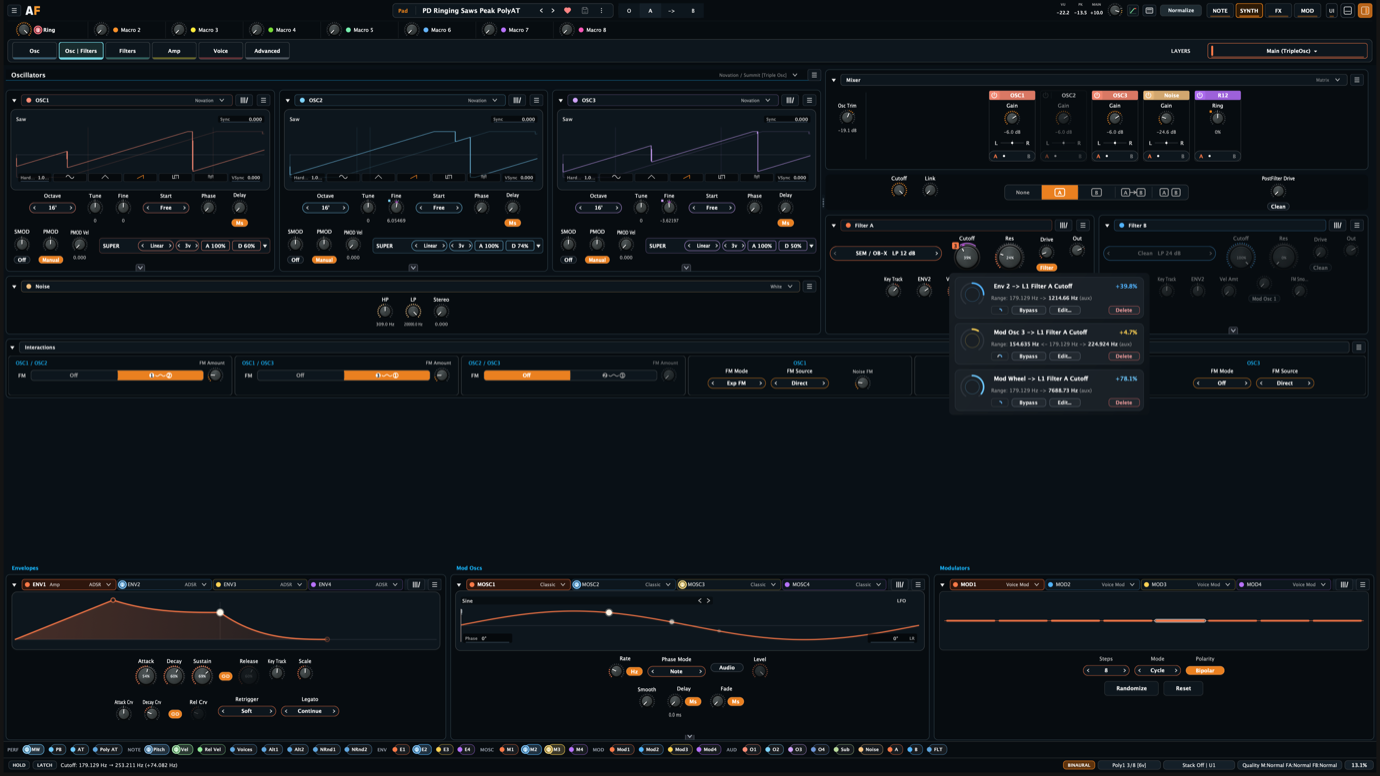
Mod rails and mod chips
Modulation should be visible where it affects the sound. Rails and small mod chips—the tiny circular indicators on controls—keep the relationship between a parameter, its modulation, and the resulting value close together, so I do not have to mentally reconstruct the patch from a separate routing page every time I touch a parameter.
The color system follows the same rule: modulation sources, mod-matrix routes, and mod chips share source colors, so a route can be recognized in the matrix, at the control, and in the surrounding editor without re-reading every label.
Popup route editing
For quick changes, routes can be edited in place instead of forcing a full-screen detour. The popup route editor keeps individual routes color-coded too, so a small assignment or depth tweak can stay visually connected to the same modulation source shown in the full MOD workspace.
Drag, drop, reorder
Samples, wavetables, effects, and chain structure need to move quickly. Drag-and-drop asset loading and drag/reorder FX authoring are boring features until they save twenty tiny interruptions in one patch session. Then they matter a lot.
Presets for useful chunks
Presets are not only for complete patches. The useful version is being able to recall the parts that actually become building blocks: oscillator setups, envelopes, modulators like LFOs and steps, note-generator settings, filters, FX modules, and whole FX chains.
What you see is what you hear
Envelopes, modulators, parameter values, route feedback, meters, waveform views, filter responses, live matrix state, and the gain-staging graph should explain what the patch is doing while it is doing it. The goal is not decoration; it is being able to trust the interface while making decisions by ear.
Deep when needed, immediate by default
I want the deep editors available, but I do not want every sound-design move to require one. A good workflow lets the simple change stay simple and keeps the complicated path available when the patch actually needs it.
Signal path & gain staging
Balance the signal. Edit the structure.
The overview follows the selected layer from oscillator output through its mixer, filters, voice and layer stages, FX buses, limiter, and final synth output. Standard and Detail show the same route at different depths, keeping the signal flow and its level context connected.


Performance profiles
Play and Glide are part of the patch.
Instead of hiding voice assignment inside a few numbered poly modes, Aural Forge saves Play and Glide as two small preset groups. Play decides what happens to voices as notes arrive, repeat, overlap, and release. Glide decides when pitch movement happens and how that movement is calculated. Choosing one of each gives a patch a deliberate hardware-style response without rebuilding the underlying policy one switch at a time.
- Poly: First Available, First Available Retrigger, First Available Curtail, Round Robin, Round Robin Retrigger, Round Robin Curtail, and Reuse Oldest.
- Mono: Last Continue / Retrigger, High Continue / Retrigger, Low Continue / Retrigger, and Round Robin.
- Glide: Off, Overlap, or Always; fixed duration or fixed speed; starting from the Previous Note, a Range-Limited position, the Voice Last Triggered, or Current Pitch.
Continue lets release tails finish naturally; Curtail fast-releases older tails when a new note is accepted so they do not keep accumulating. Retrigger restarts the relevant repeated-note or mono transition, while Reuse Oldest redirects the oldest released voice before consuming another unused one. Overlap keeps glide legato-only; Always also glides when the notes do not overlap.
This is the part that is harder to show in a bullet list but matters constantly in use: fewer context switches, more feedback at the control, and less guessing about what is happening under the hood.
Edit where the modulation lands
The route stays attached to the control.
The badge on Filter A’s cutoff shows that two routes are active. Opening it keeps each route beside the parameter it affects, with the source color, amount, polarity, bypass state, and an accurate preview of the resulting cutoff range shown in the parameter’s real units.
That is enough for most quick changes. When a route needs deeper work, a double-click opens the full modulation matrix with that route already highlighted instead of making me find it again.

09
Development build
Workflow speed and visual feedback
From an experiment to an instrument
Four layers, one content system.
A patch can combine four independently selected oscillator blocks with per-layer mute, solo, level, pan, transpose, and note behavior. Across the instrument, patches, module presets, filter profiles, wavetables, samples, and impulse responses use a repository-oriented browsing and metadata workflow.
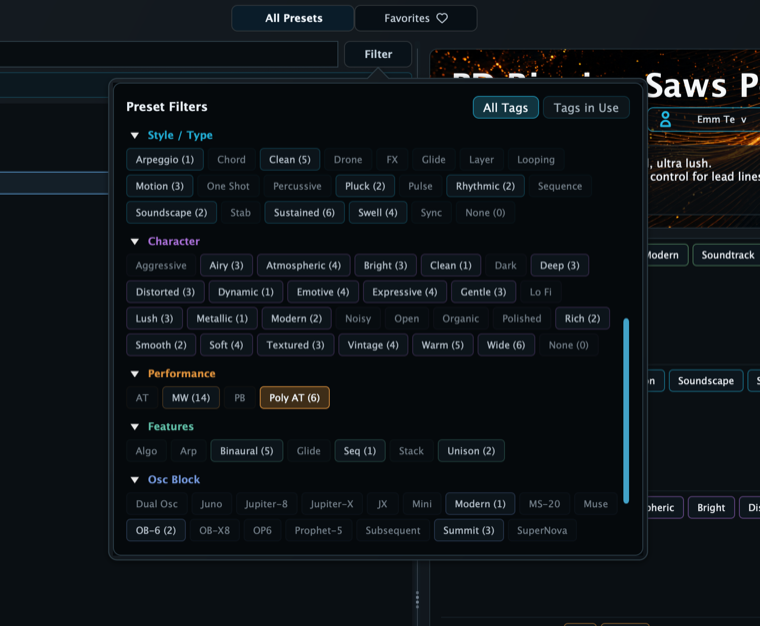
The browser keeps authored musical metadata—genre, style/type, and character—alongside details derived from the patch itself. Performance controls, active features, and oscillator-block profiles are detected automatically, so a preset can be found by what it does as well as what I happened to call it. Folders, recursive search, active filter chips, favorites, authoring, and preset workflows for enabled oscillator, filter, and effect groups stay in the same system.
The same tags and preset-discovery model are exposed through CLAP. In a host that supports CLAP preset discovery—Bitwig Studio is the practical example—Aural Forge’s Factory and User presets can appear in the DAW’s own library with useful metadata instead of being confined to the plug-in browser.
Search the patch, not only its name
Useful metadata without extra preset housekeeping.
Performance, Features, and Osc Block tags are populated from the actual preset configuration. The filter view combines them with the musical tags I author, shows how many matching sounds are available, and makes combinations such as Poly AT + Binaural + Summit a practical way to search the library.
That same thinking belongs at smaller scales too: envelopes, modulators, note-generator settings, filters, FX modules, and FX chains should be reusable when they become part of the way I work.
The goal is simple: if I spend time building a sound, a movement pattern, or an effects chain, I want to be able to find it again and keep shaping it.

Current implementation snapshot
The current technical short list.
Oscillators
13 cores · 11 block surfaces · 22 grouped choices · up to 8× oscillator quality
FM
6 operators · 40 algorithms · 19 operator waveforms · operator filters and Filter FM
Voice
4 layers · 256-voice pool per layer · up to 16-way unison drawn from that pool · binaural and stacked voice systems
Modulation
32 routes · 2 auxiliary terms each · 8 macros · 256 dynamic host mappings
Filters
2 slots · 8 families · 20 profiles · source-aware routing and audio-rate FM
Note generation
64-step Matrix patterns · Root/Fixed/K1–K5 roles · probability lanes · advanced multitrack Tracker
Effects
15 processors · 3 structural splitters · Main plus 2 buses · nested lanes
Current builds
Standalone · VST3 · CLAP in the current project
Aural Forge is still in active development. The interface, factory content, formats, and exact numeric claims will be checked again before this becomes proper release copy. These screenshots are from development builds running on my 16-inch MacBook Pro with an Apple M4 Max and 64 GB of memory. I am not trying to make the smallest CPU-footprint synth I possibly can. I am building it with a quality-first bias, and some choices intentionally spend processing power where I think the sound or workflow earns it. On that machine, it is still comfortable for the way I write tracks as Emm Te, with as many instances as I normally need in a session.